Encapsulate as Inline Function
Introduction
Section titled “Introduction”The Encapsulate as Inline Functioncommand convert the selected code into a new inline table-valued function and optionally replaces it with a SELECT from the new function.
⚡ ** note: ** Only SELECT statements can be encapsulated in inline table-valued functions.
SELECT INTO and SELECT @local_variable statements are not allowed.
To encapsulate code as a new scalar function:
-
Select the script that you want to use for the new function.
-
On the SQL Enlight->Refactormenu, click Encapsulate as Inline Function.
-
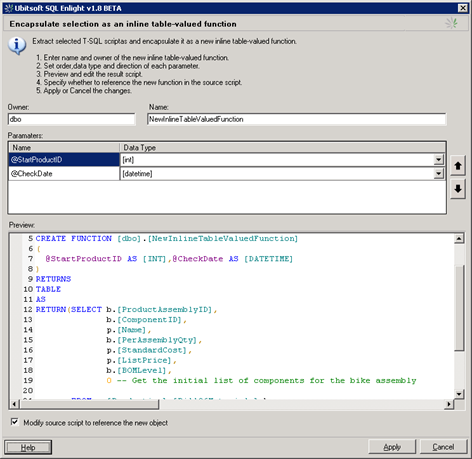
The Encapsulate as Inline Functiondialog box is displayed.
The SQL script for the creation of the function is displayed in the Previewbox.
-
Type the name of the owner in the Owner edit box.
-
Type the name of the function in the Name edit box.
-
Modify the order and the type of the parameters using the Parameters grid.
⚡ ** note: ** The function name is not checked for duplicate names. If a function with this owner and name already exists, the script will fail.
-
Review the generated script in the Previewbox and modify it if necessary.
-
Select Modify source script to reference the new objectif you want SQL Enlightto modify the originating script and replace the encapsulated code with reference to the new function. The generated reference to the new inline table-valued function is a SELECT statement that is selecting from the return of the function.
-
Click Applybutton to apply the changes.
Parameters
Section titled “Parameters”The parameters of the new objects are determined from the variables which are referenced in the selected code.
SQL Enlightautomatically resolves the data type and the direction of these parameters. If a variable is used but declared nowhere in the script, its declaration in the resulting script will have sql_variantdata type.