Manage Layout Templates
Introduction
Section titled “Introduction”The topic describes the layout templates and how these templates can be managed in SQL Enlight.
Layout Templates
Section titled “Layout Templates”A layout template is a set of layout rules that can be stored and later reused.
Each layout template is stored in a separate configuration file.
The layout template configuration file name is used to identify the template when it is registered in SQL Enlight.
Existing layout templates can be exported or imported in SQL Enlight, or new templates can be created.
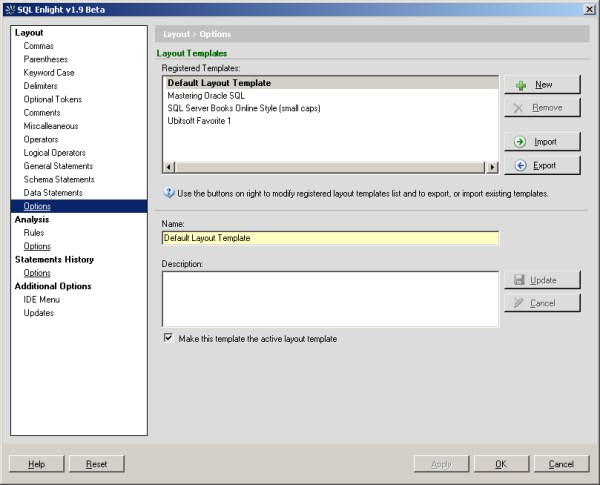
Activate Layout Template
Section titled “Activate Layout Template”The active layout template is the layout template that holds the current layout rules. Changing the layout rules at the layout rules tab will affect only the active layout template.
To change the active layout template, use the Quick Templates Listor select a template from the Registered Templateslist, start editing it, check the Make this template the active layout templateand save the changes.
The active template appears bold in the Registered Templates list.
Quick Templates List
Section titled “Quick Templates List”The Quick Templates Listis a dropdown list that can be found on the SQL Enlight Toolbar.Using the Quick Templates Listyou can fast switch the active template to another one and reformat your SQL code with the rules of the new template.
Edit Layout Template
Section titled “Edit Layout Template”To change the layout setting of a layout template, it first has to be set as the active template, and then just then its rules can be modified.
Applying SQL Enlight settings will flush changes of the active template to its source file.
The only property that can be changed without making a template active is its Description, which can be edited and updated when the template is selected in the Registered Templateslist.
Create New, Import, Remove and Export Layout Template
Section titled “Create New, Import, Remove and Export Layout Template”The New, Import, Remove, and Exportbuttons on the right of the Registered Templateslist can be used to register or unregister layout templates.
Deleting a layout template will unregister the template from SQL Enlight, and it will be no more available in the Registered Templateslist.
⚡ ** note: ** If the template named Default Layout Templateis deleted, the next time the SQL Enlight is started, a template with the same name will be recreated, containing no active layout rules.
Reset Layout Rules
Section titled “Reset Layout Rules”The Resetbutton appears at the bottom-left corner of the Optionsdialog. Using the Reset button will discard all changes to the active layout template since the last save.