Quality Gates
Introduction
Section titled “Introduction”The Quality Gate feature in SQL Enlight provides a configurable way to enforce SQL coding standards and quality goals. A Quality Gate combines metrics, policies, and weighting rules to determine whether an analysis run passes, warns, or fails according to your organization’s requirements.
Using the Quality Gate in Analysis
Section titled “Using the Quality Gate in Analysis”Once enabled, the Quality Gate is evaluated after each analysis run. The gate interprets metric results, applies policies and weights, and then produces:
-
An overall quality score and grade.
-
Category-level scores.
-
Fail and warn reasons derived from policy violations.
-
A detailed metric breakdown.
-
Technical debt measures, if configured.
-
Optional regression information when regression tracking is enabled.
The Quality Gate can be applied to:
-
Individual SQL scripts.
-
Databases and database objects.
-
Projects and solutions that contain SQL code.
-
Continuous integration (CI) environments through the SQL Enlight command-line interface.
IDE Integration
Section titled “IDE Integration”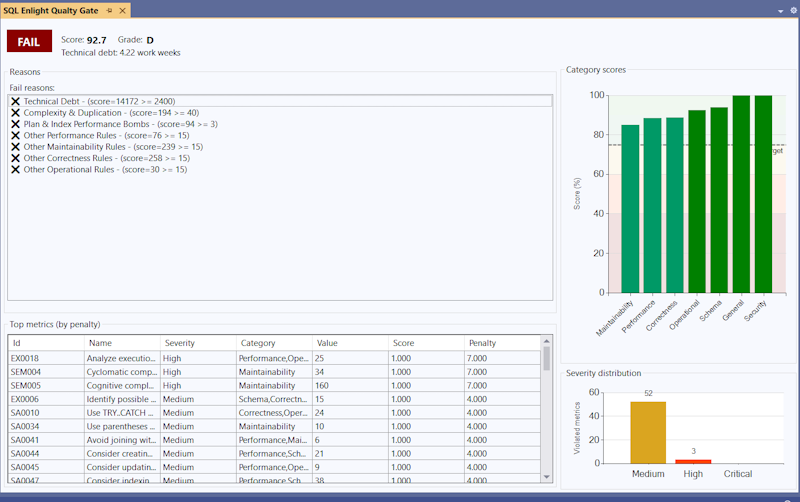
The Quality Gate Resultstool window provides a visual summary of the current Quality Gate evaluation based on the SQL Enlight analysis results. It allows you to quickly assess the overall code quality status and identify the main areas that require attention.
The tool window can be opened from the main menu using the Quality Gatecommand. When opened in SQL Server Management Studio or Visual Studio, it displays the Quality Gate results calculated from the analysis rule violations shown in the SQL Enlight Error Listwindow.
How Results Are Calculated
Section titled “How Results Are Calculated”The Quality Gate Results view evaluates the configured Quality Gate definition against the currently available analysis results. These results are derived from the same rule violations that appear in the SQL Enlight Error List.
Whenever the Error List changes-such as when analysis results are added, removed, or updated-the Quality Gate Results are recalculated automatically. This allows the Quality Gate to reflect the current state of the analyzed code in near real time.
Changes to Error List filters do not affect the Quality Gate Results. The Quality Gate always evaluates the complete set of analysis issues, independent of any visual filtering applied in the Error List window.
Displayed Information
Section titled “Displayed Information”The Quality Gate Results tool window typically displays:
-
The overall Quality Gate score and letter grade.
-
The pass, warn, or fail status of the Quality Gate.
-
Category-level scores, showing how different quality areas contribute to the final result.
-
A breakdown of metrics and their impact on the Quality Gate evaluation.
-
Policy violations with concise explanations describing why a warning or failure was triggered.
Typical Usage
Section titled “Typical Usage”The Quality Gate Results window is intended to be used together with the SQL Enlight Error List. Developers can review policy failures or warnings in the Quality Gate Results, then navigate to the corresponding issues in the Error List to inspect and fix the underlying problems.
As issues are resolved and the Error List updates, the Quality Gate Results refresh automatically, providing immediate feedback on how the changes affect the overall quality status.
CLI Integration
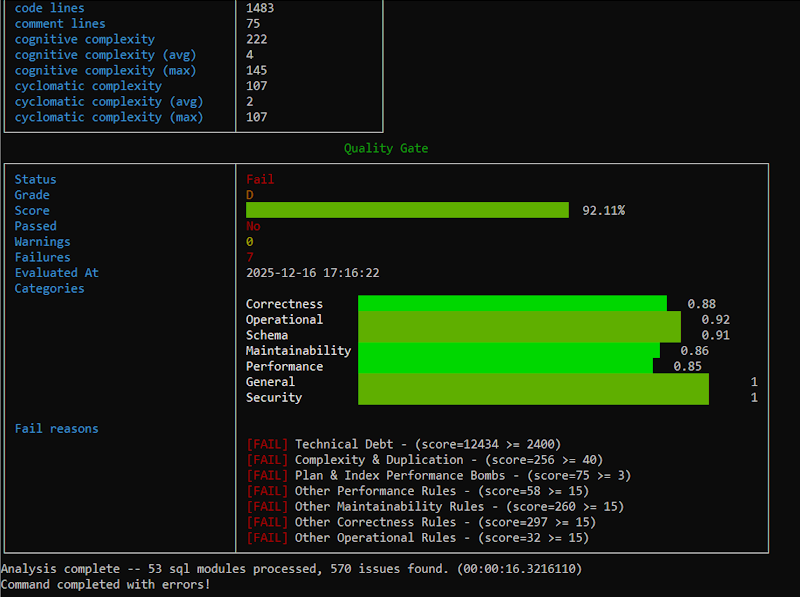
Section titled “CLI Integration”When running SQL Enlight from the command line, you can specify a Quality Gate definition file and control whether a gate failure should cause the process to fail.
Example parameters:
Enlight analyzeFiles --inputPath="E:\MyProject\SQL Script\*.sql;" --qualityGate="E:\SqlEnlight-Settings\MyGate.json" --failOn=qualityGateFailThis allows CI pipelines to enforce Quality Gate policies and fail builds automatically when critical issues or excessive technical debt are detected.
Summary
Section titled “Summary”The Quality Gate feature in SQL Enlight provides a powerful mechanism for enforcing SQL code quality. By combining metrics, policies, and weights, you can express organization-specific rules about security, correctness, performance, maintainability, and operational concerns.
Key benefits include:
-
Early detection of dangerous SQL patterns and data-loss risks.
-
Improved adherence to security and performance standards.
-
Tracking of complexity and technical debt.
-
Support for regression detection across analysis runs.
-
Integration with CI pipelines to automatically enforce quality requirements.
Use the Quality Gate editor to customize metrics, configure policies, tune category and severity weights, and align the gate’s behavior with the priorities of your team or organization.