T-SQL Script Summary
Introduction
Section titled “Introduction”Using the Script Summaryyou can view a short summary of any of the the batches and the statements in the current T-SQL script.
View the script summary
Section titled “View the script summary”-
Open the script in a SQL Server Management Studio query editor or in Visual Studio 2005 text editor
-
Use the Script Summary…command on the SQL Enlightmenu.
The script summary will be displayed in a toolbox window.
- You can uncheck the Don’t show batch nodesoption to include the batches in the script summary.
Batches are not by default shown in the summary.
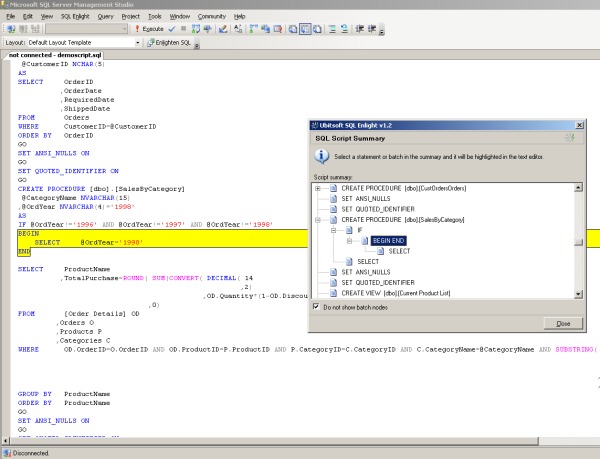
The Script Summaryis hierarchically structured. All statements in it are grouped in batches. All batches and statements that contain nested statements can be expanded.
When you select a statement or a batch it is highlighted in the text editor along with all of its nested statements.