Qualify Object Names
Introduction
Section titled “Introduction”The Qualify Object Namescommand modifies T-SQL code in a way that all the database objects referenced in it are in the format:
[schema_name].[object_name]
⚡ ** note: ** The SQL Server name and database name are not added to the object name.
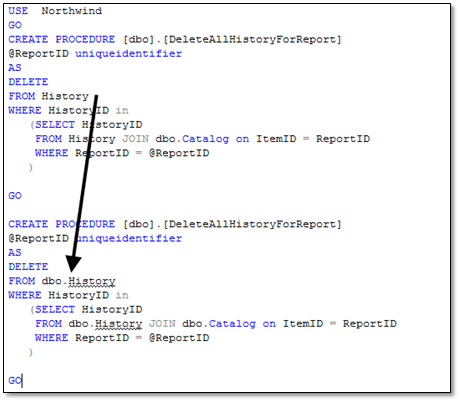
To qualify object names:
1.Open the script in a SQL Server Management Studio query editor. 2.Ensure you are connected to the SQL Server and database that contains the objects that are referenced in the script. 3.If required, select the code that contains the object names that you want to qualify. If you do not select any code, all object names in the script are qualified.
4.On the SQL Enlightmenu, click Refactor->Qualify Object Names.
SQL Enlight connects to the SQL Server, resolves the not qualified identifiers, and modifies the script. For each resolved or unresolved object name, a message is added to the SQL Enlight Error Listdescribing the result.
The changes made by the Qualify Object Namescommand can be undone by using the standard Undo features of the code editor.