Validating and Formatting T-SQL Code
Introduction
Section titled “Introduction”Using the Validate SQLand Reformat SQLcommands you can validate the syntax of your SQL code and reformat it using the layout rules stored in the active layout template.
Reformatting a selection of T-SQL code
Section titled “Reformatting a selection of T-SQL code”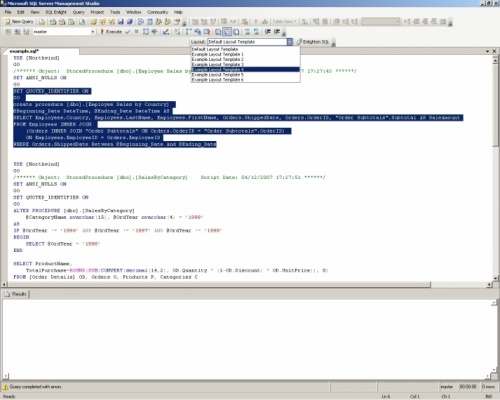
-
Select Layout Template from the Quick Template List drop-down or edit the active Layout template using the Optionscommand of the SQL Enlight menu.
-
Select SQL code to reformat or else the whole document will be reformatted.
-
On the SQL Enlight menuclick Reformat SQLbutton or use the Ctrl + Alt + Fkeyboard shortcut.
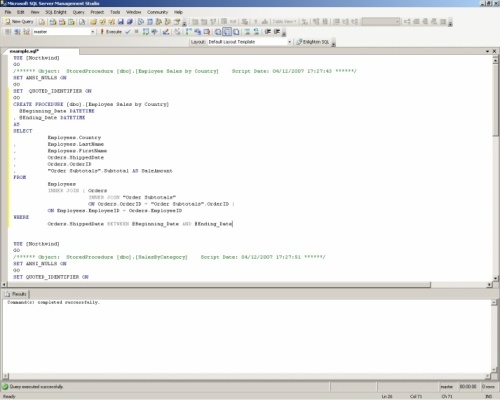
Reformatting a T-SQL Script file
Section titled “Reformatting a T-SQL Script file”-
In SQL Server Management Studio or Visual Studio , on the File menu, click Open-> File.
-
Select file containing T-SQL script.
-
Choose Layout Template from the Quick Template Listdrop-down or use currently selected.
-
Use Reformat SQLbutton on the SQL Enlight Toolbaror Reformat SQLmenu item on the SQL Enlightmenu.
You can undo the changes to the script using the standard SQL Server Management Studio and Visual Studio Undocommand.
Validating T-SQL Script
Section titled “Validating T-SQL Script”-
Select T-SQL script in the text editor.
-
Use Validate SQLcommand on the SQL Enlightmenu.
If there are T-SQL script analysis rules violations, the SQL Enlight Error List Windowwill be displayed and the errors will be marked in the text editor.
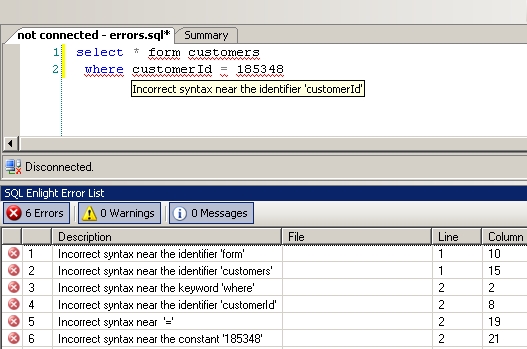
Double-click any error message entry to open the file where the problem occurs, and move to the error location.
To sort the list, click any column header.
Use the Errors, Warnings, and Messagesbuttons to select which entries to display.
Errors
Indicates the number of Errors in the list. Click to toggle whether Errors are displayed.
Warnings
Indicates the number of Warnings in the list. Click to toggle whether Warnings are displayed.
Messages
Indicates the number of Messages in the list. Click to toggle whether Messages are displayed.